
The Hidden Architecture Problem: AI Inherits Your Integration Debt

The Hidden Architecture Problem
AI Inherits Your Integration Debt
Your AI is only as fast as the slowest system it has to call.
An AI agent can answer a question in seconds. Then it has to pull data from three systems: one is slow, one hasn't refreshed since last night, and one has permission rules built for people clicking through screens. The demo was fast. Production isn't.
The usual reaction is to blame the model. Usually, the model isn't the problem. The systems it depends on are. Years of disconnected applications, ageing integrations and inconsistent data become visible the moment AI starts using them.
This hits hardest in businesses built through acquisition. A buy-and-build platform often runs several CRMs, more than one ERP and a tangle of data feeds inherited from each deal. That is integration debt by definition, and every AI agent placed on top of it inherits the debt. The stakes are real: Gartner predicts that through 2026, organisations will abandon 60% of AI projects unsupported by AI-ready data.
The fix isn't a better model, and it isn't another custom connector for each new AI project. It's one shared access layer that every AI application uses. The rest of this post explains why, and what that layer needs to do.
AI Cannot Outrun the Systems Behind It
Enterprise AI applications rarely work alone. They pull from CRM platforms, ERP systems, databases, internal documents and data feeds, and each source brings its own limits. Older APIs respond slowly. Batch jobs mean the latest information isn't there until the next scheduled refresh. Different applications store the same information in different formats, or define the same business term differently.
None of this is new. What is new is that an AI agent depends on all of it at once, so every system's limits become part of the AI experience. If an assistant preparing a customer update has to check orders, billing and service history, the slowest system sets the pace and the most outdated one sets the accuracy.
A better model fixes neither.
A Simple AI Task Can Reveal a Bigger Problem
Imagine a company introduces an AI agent to help its operations team prepare customer account summaries.
The agent needs to check the CRM for customer details, the ERP for order status, and another application for recent service issues. It then brings the information together into one summary.
On paper, this sounds like a straightforward use case.
But the ERP takes several seconds to respond. The latest order information is still sitting in a batch process. The service application has separate access permissions that the agent must respect.
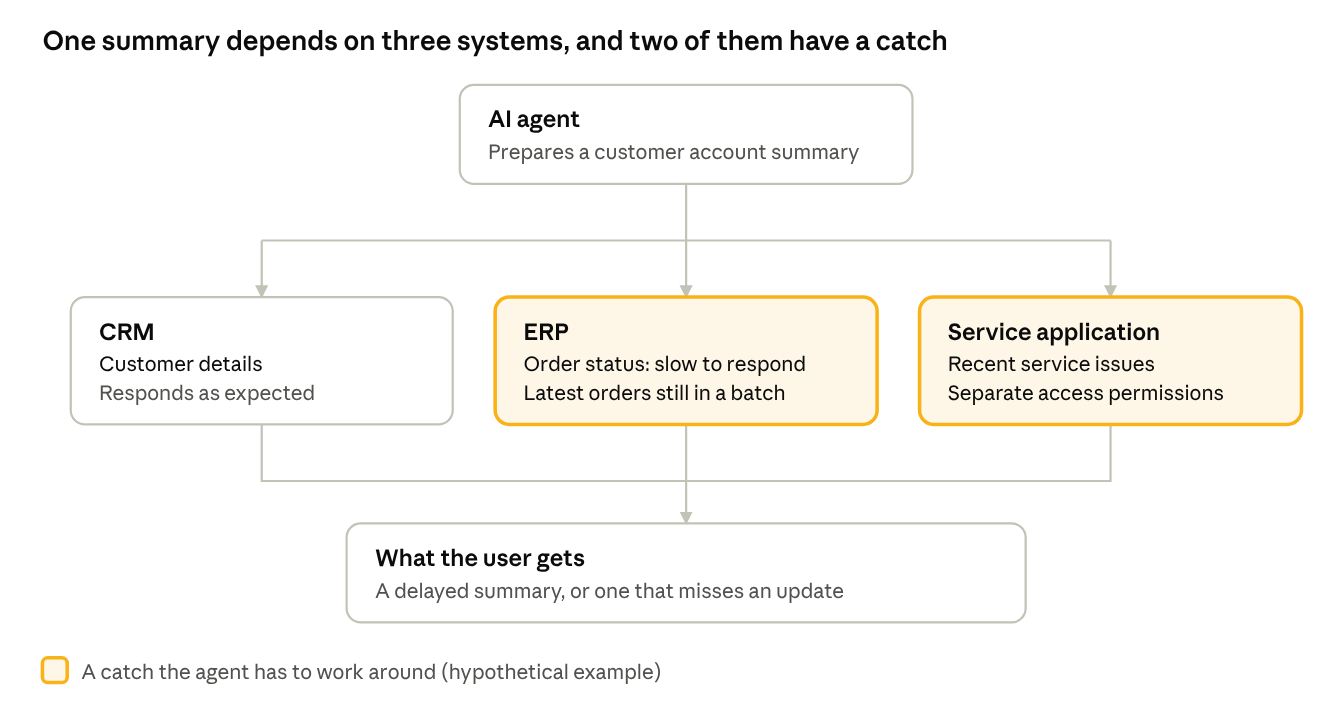
The account-summary scenario · hypothetical
Now the agent has to wait, work around missing information, and make sure it does not access anything the user is not allowed to see.
The result could be a delayed summary or an answer that misses an important update.
This is a hypothetical example, but it illustrates a common architectural challenge: a task that looks simple from the user's perspective may depend on several systems working together behind the scenes.
The model is only one part of that process. The integrations, data flows, and access controls matter just as much.
The Same Problem in Information Services
Information-services businesses feel this even more sharply, because data is the product. Picture an agent that builds a company profile for an analyst from three sources: recent regulatory filings, the firm's own internal database and a vendor feed that arrives once a week.
Each source runs on its own clock. Filings change when the company files. Researchers update the internal database through the day. The vendor feed can be a week old by the time the agent reads it. Unless the system knows how fresh each source is and which one wins when they disagree, the agent blends them into one confident profile that is partly out of date, and nobody can tell which part.
Why the Model Isn't the Only Bottleneck
When an AI application is slow, the first instinct is to look at the model: a faster one, a different one, a better prompt. Those are fair questions, but they miss most of the picture.
An agent typically retrieves information, checks permissions, calls an API, processes the result and calls another system before it can answer. Each step adds time, and many can't start until the one before finishes.
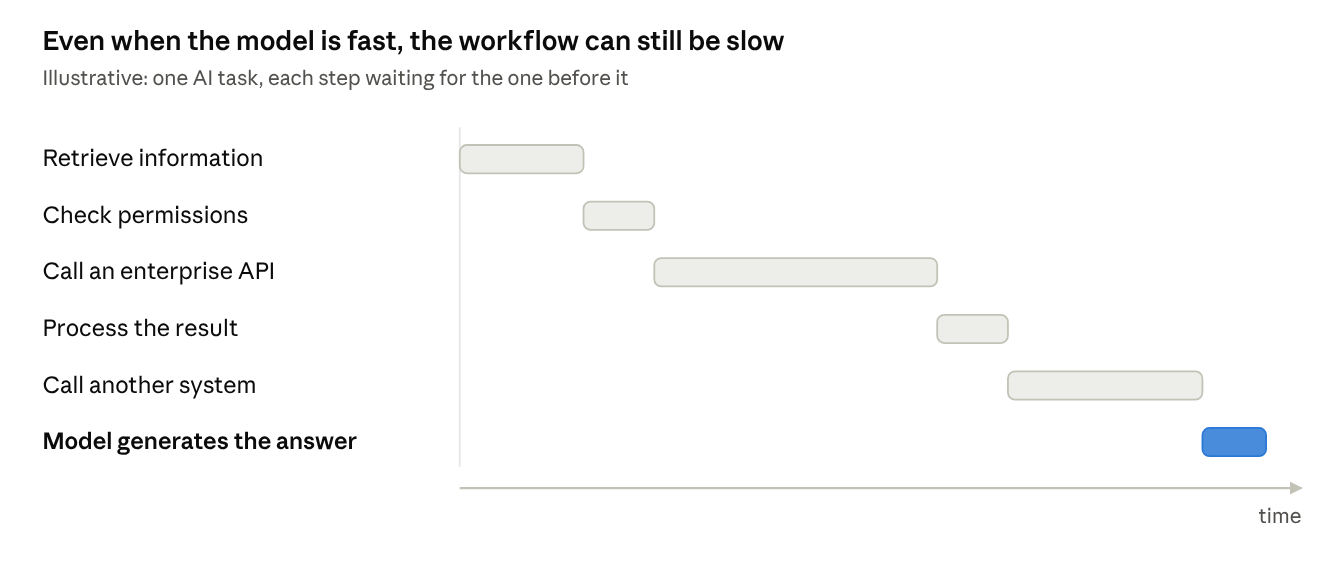
So a fast model still sits inside a slow workflow.
Data quality is the second issue. If two systems define an active customer differently, the agent has no way to settle the difference. It produces an answer that sounds right and still breaks the business's own rules.
Security is the third. An AI application should not see every record just because it has a database connection. It has to respect the permissions of the user, the data and the action being performed.
Without a view of each step, teams tune the model while the real problem sits untouched. The question isn't "How quickly can our AI respond?" It is "How quickly and reliably can the whole workflow get the job done?"
The Solve: One Shared Access Layer, Not More Bespoke Connections
The instinct, once a pilot slows down, is to build a better connection for it: a custom API call here, a direct database read there, a nightly extract for the one report the agent needs. It works for that use case. Then the next AI project arrives and builds its own.
That is how integration debt grows. Three AI applications talking to four systems means twelve custom connections, each with its own copy of the data definitions, its own permission logic and its own fixes when something breaks. The fifth project repeats the work of the first. Bespoke connections don't pay down technical debt; they add to it.
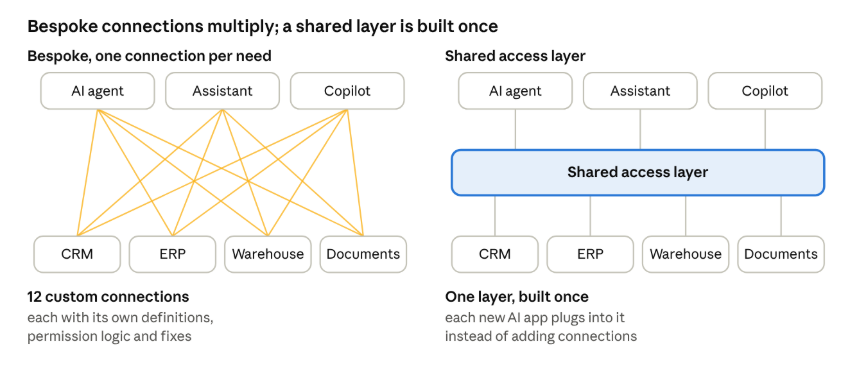
The solve is to build the access layer once and make every AI application use it. The legacy systems stay where they are. What changes is that AI stops talking to them directly. Instead, it goes through a single layer that keeps data current, applies the same definitions and permissions to every request, and records what happened. Each new AI use case then becomes a matter of plugging in, not another integration project.
You don't need to replace anything to get there, and you don't need to build it all at once. Start with the systems behind the use case that matters most, and let the layer grow as more applications use it. That layer has three jobs.
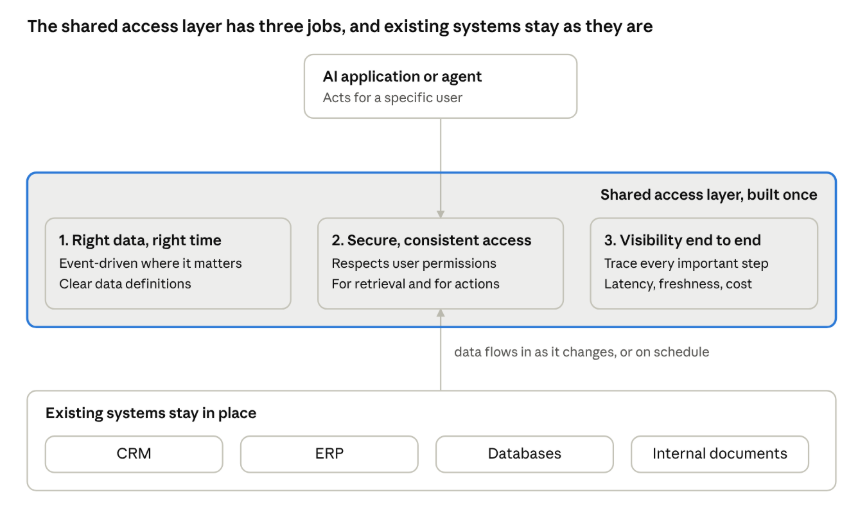
1. Make Sure AI Can Access the Right Data at the Right Time
An AI application is only as useful as the information available to it.
If a workflow depends on current inventory, order status, or operational updates, waiting for an overnight data refresh may not be good enough. In these cases, event-driven data flows can help information become available when relevant changes occur.
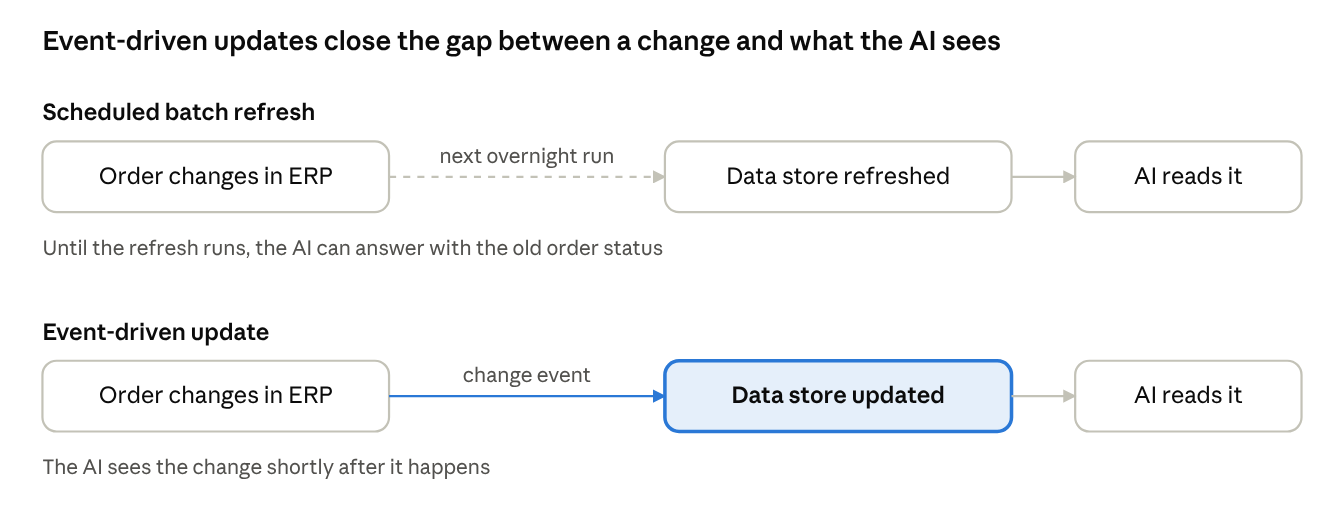
Scheduled batch vs event-driven data flow
Other workflows may work perfectly well with scheduled updates. The important thing is to understand how current the data needs to be before choosing the architecture.
Businesses should also look at how their systems exchange information. Reusable APIs and clear data definitions can reduce the need to build a new, custom connection every time another AI application is introduced.
The goal is not to make everything real-time. It is to make data access fit the needs of the business.
2. Keep Data Access Secure and Consistent
Giving an AI system access to more data is not the same as giving it the right access. An internal assistant that retrieves contracts, financial records and service documents serves employees who are each allowed to see different parts of that information. Retrieval has to respect those differences, and permissions have to stay consistent as data is updated or access rights change.
A shared retrieval layer handles this once, across approved sources, instead of every AI application inventing its own approach. That matters most for retrieval-augmented generation (RAG), where the model answers from enterprise data it has just retrieved.
Retrieval is only half of it. When the AI uses tools or takes actions, the same identity, authorisation and access rules must apply. Security belongs in the design from day one, not bolted on after launch.
3. See What Happens Across the Entire Workflow
When an AI task fails, teams need to know where it started. Was an API slow? Was the data outdated? Did a permission check fail? Did the agent repeat the same call? Without visibility across the workflow, each of those questions takes far too long to answer.
Trace the important steps, from retrieval through every enterprise system call to task completion. Measure response time, failure rate, data freshness and the cost of a successful workflow. That separates model problems from system problems, and it shows leaders whether the AI is actually improving the process it was built for. A successful AI project doesn't just produce a good answer. It helps people finish their work reliably.
The Cost of Ignoring Integration Debt
Integration problems look like technical details until they reach everyday operations. Slow workflows frustrate users. Outdated information leads to poor decisions. Custom integrations pile up with every new AI application, and repeated calls and retries quietly raise operating costs. Once agents can retrieve sensitive information or act across systems, security gaps become a real exposure.
None of this means every AI project needs an architecture overhaul. It means the work to make AI dependable has to be understood, and paid for, before deciding how far and how fast to scale.
What This Means for the AI Budget
An AI budget that covers model access and application development, but not integration, data engineering, security, testing and monitoring, is incomplete. For PE-backed companies the stakes are sharper. If AI savings are in the value creation plan, the integration work they depend on has to be in the budget and the timeline too. Otherwise the savings arrive late, if at all, and the plan carries a cost it never priced.
Before moving an AI application into production, leaders should ask:
- Are the systems it depends on fast and reliable enough?
- Is the information it retrieves accurate and up to date?
- Can it access only the data it is authorised to use?
- Can the team see where failures and delays occur?
- What does it cost to complete the entire task successfully?
- Will the next AI application reuse this integration, or need one of its own?
- Is the integration work in the same budget and timeline as the savings that depend on it?
The answers show whether to improve an existing integration, redesign part of a workflow or invest in a bigger change.
Before Scaling AI, Look at What Sits Behind It
The model gets the attention because it is the visible part. The systems behind it decide whether the AI delivers consistent results in the real world. Legacy integrations, disconnected data and unclear access rules don't disappear when AI arrives. They matter more once AI starts connecting information and doing work across systems.
Table of Contents
- AI Cannot Outrun the Systems Behind It
- A Simple AI Task Can Reveal a Bigger Problem
- The Same Problem in Information Services
- Why the Model Isn't the Only Bottleneck
- The Solve: One Shared Access Layer, Not More Bespoke Connections
- Make Sure AI Can Access the Right Data at the Right Time
- Keep Data Access Secure and Consistent
- See What Happens Across the Entire Workflow
- The Cost of Ignoring Integration Debt
- What This Means for the AI Budget
- Before Scaling AI, Look at What Sits Behind It
Start with a focused, high-impact scope
Deliver more with fewer
people.
Bring us a data operations bottleneck, a delivery capability gap, or a GCC ramp challenge. We'll recommend the right team shape and operating model and prove it with a real working engagement.