
Elasticsearch Explained: How Search Works at Scale

Elasticsearch Explained
How modern search engines find the right answer fast - and never go down
Every product with a search box - an online store, a support portal, a knowledge base, an app full of user content - lives or dies by how good that search box is. Type a few words and get the right result in milliseconds, and people trust the product. Get irrelevant results, or wait too long, and they leave.
Our engineering team recently went hands-on with Elasticsearch, one of the most widely used search engines in the industry, to understand exactly what it takes to build search that is fast, relevant, and reliable. Here is what we learned, in plain English.
What Is Elasticsearch?
Elasticsearch is a search engine you can plug into almost any application. You send it your data as simple JSON records, and it organizes that data in a way built specifically for search - not just "does this record exist," but "which records best match what the user is looking for, ranked by relevance, in milliseconds, even across millions of records."
It powers everything from e-commerce search bars to log analysis dashboards to AI-powered "search by meaning" experiences - and it is open source, meaning any team can run it themselves.
More Than Keyword Matching: The Many Ways to Search
A common misconception is that "search" means one thing: match the words the user typed. In practice, great search experiences combine several different techniques depending on what is being searched and what the user is trying to do. Here is a snapshot of what is possible, illustrated with a simple example: searching a product catalog.
| Search Capability | What It Does in a Product Catalog Example? |
|---|---|
| Full-Text Search | Find products whose description mentions the words a shopper typed, ranked by relevance, not just presence. |
| Exact Match | Look up a product by its exact SKU or ID, with no guessing and no partial credit. |
| Phrase & Proximity | Match an exact phrase like "wireless noise cancelling," or allow the words to appear near each other rather than word for word. |
| Filters & Combinations | Combine conditions such as "in this category, under $50, in stock" all at once. |
| Pattern Matching | Autocomplete as a shopper types, tolerate typos such as "blutooth" still finding "bluetooth," or match flexible patterns. |
| Range Search | Find everything priced between $20 and $50, or added to the catalog in the last 30 days. |
| Location Search | Find the nearest store or warehouse within a given distance. |
| Semantic AI Search | Understand what a shopper means, not just the words they used. A search for "cozy winter throw" can surface a product described as a "warm knit blanket," with zero shared keywords. |
| Hybrid Search | Combine keyword precision with semantic understanding for the best of both. |
| Relevance Reranking | Take a shortlist of good candidates and reorder them with a smarter, more precise model, the same pattern used in modern AI search and chatbot systems. |
Seeing It in Action
To really understand these search types, our team built a small internal tool that runs each one against a live Elasticsearch index and shows the exact query and results side by side. Here it is running a full-text search:
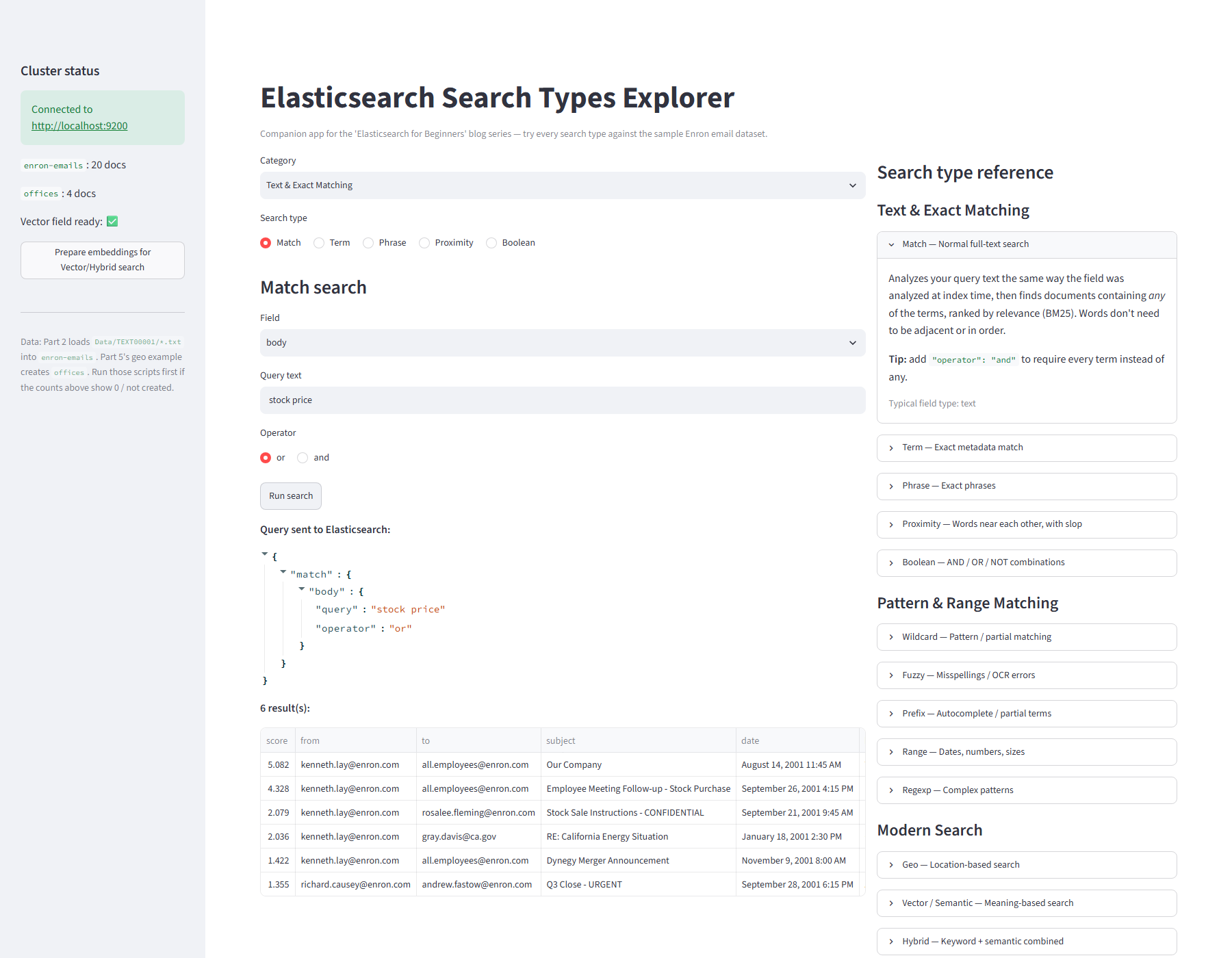
Our internal Elasticsearch search-types explorer, built to test each search type hands-on against real, indexed data.
Built to Stay Online: Sharding, Replication, and Failover
Fast, relevant search is only half the story. The other half is reliability. Search has to keep working even when hardware fails, and it has to keep up as data grows into the millions or billions of records. Elasticsearch handles this with three connected ideas.
1. Sharding - Splitting Data So It Scales
Instead of storing an entire dataset in one place, Elasticsearch splits it into pieces called shards, spread across multiple machines. Each machine only has to hold and search its own slice of the data, so as data grows, you add more machines rather than asking one machine to do all the work.
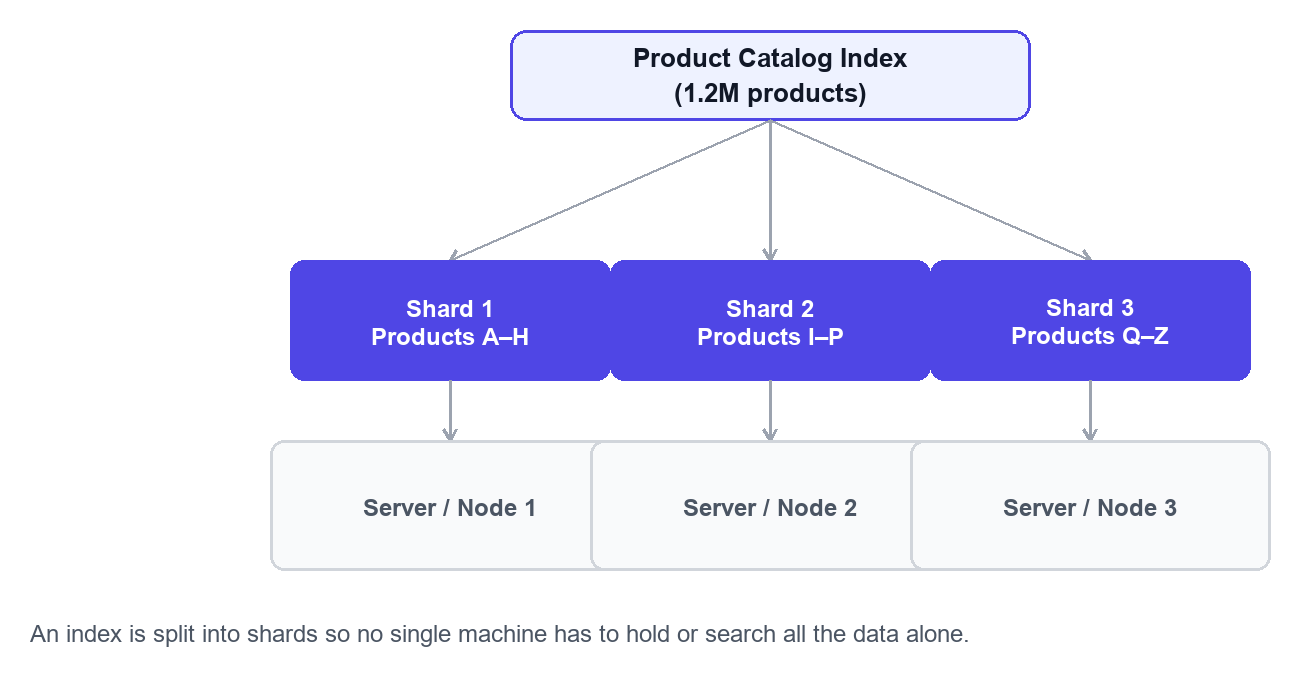
An index is split into shards so no single machine has to hold or search all the data alone.
2. Replication - Copies for Safety and Speed
Every shard also has one or more replica copies, always kept on a different machine than the original. This means two things: a copy of every piece of data always exists somewhere else, and search requests can be spread across both the original and its copies for extra speed.
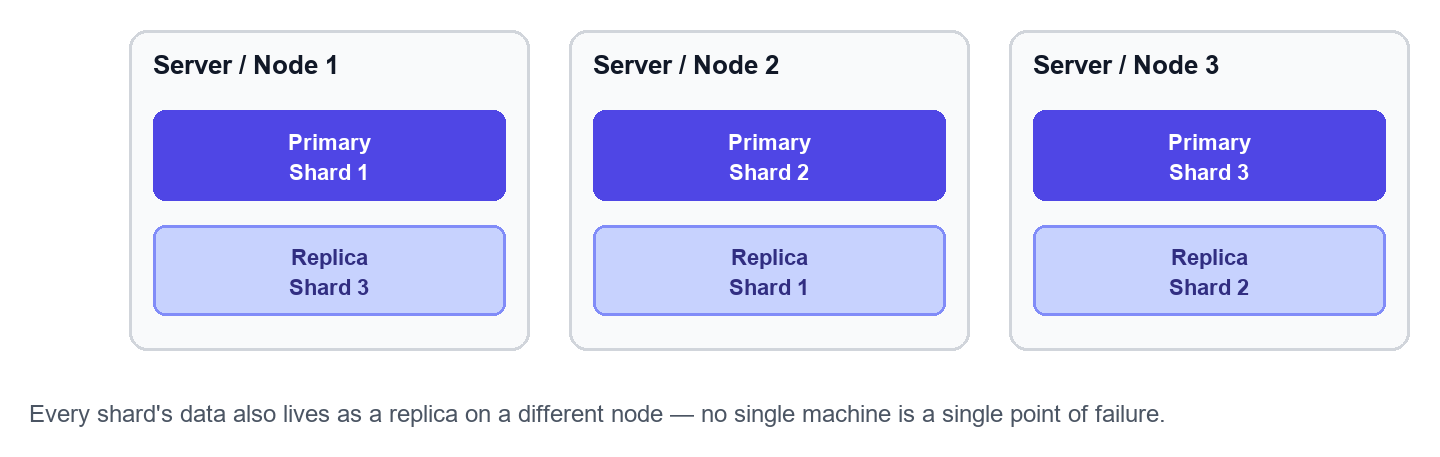
Every shard's data also lives as a replica on a different node, avoiding a single point of failure.
3. Failover - Staying Online When Something Breaks
This is where sharding and replication pay off. If a machine goes down unexpectedly, Elasticsearch automatically promotes one of the surviving replica copies to take over as the primary, instantly and with no manual intervention. Search keeps working for end users, even while the failed machine is being fixed or replaced.
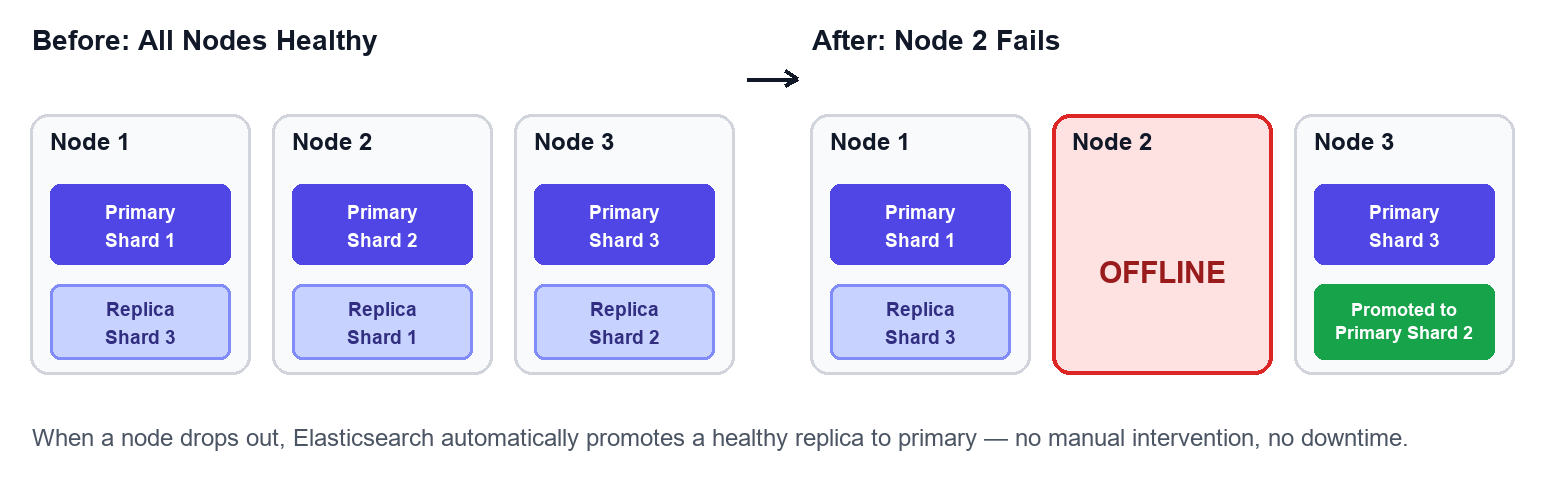
When a node drops out, Elasticsearch automatically promotes a healthy replica to primary, with no manual intervention and no downtime.
Together, these three ideas are why large-scale search products can promise "always on" search experiences even as they run on hundreds of everyday machines, any one of which can fail on any given day.
Why It Matters?
Search is one of those things users only notice when it is bad. Behind every fast, relevant, always-available search bar is a set of deliberate engineering decisions: how data is split, how it is copied for safety, how the system recovers from failure, and how many different ways it lets you actually find what you are looking for.
We are sharing what we learned because we think understanding the "how" makes the products we build, and use every day, a little less like magic and a little more like something we can all reason about.
Table of Contents
Start with a focused, high-impact scope
Deliver more with fewer
people.
Bring us a data operations bottleneck, a delivery capability gap, or a GCC ramp challenge. We'll recommend the right team shape and operating model and prove it with a real working engagement.